
YouTube Audience Retention: 10 Strategies, Mapped to Your Drop-Off Curve
Your retention graph is the most honest piece of feedback YouTube gives you.
It tells you, frame by frame, where the video stopped working. Most of us never look at it as a map.
Every retention curve I've studied breaks into the same five zones — and each zone fails in predictable ways. This is the post I wish someone had handed me at 5,000 subscribers.
Retention is an architecture problem, not a personality problem. Open YouTube Studio, pull the retention curve for your last five videos, and you'll see the same five zones bleed viewers in similar ways: cold-open drop (0–5%), steady decline (5–40%), mid-video slump (~40–55%), long tail (55–95%), end-screen handoff (last 5%). Ten tactics, mapped to each zone, below.
The retention graph is the most honest feedback YouTube gives you
Open YouTube Studio → any video → the Analytics tab → Engagement. The curve at the top of that screen is the only feedback in the entire system measured second by second. Comments are loud minorities. CTR tells you about the thumbnail. Watch time is a rollup. The retention curve tells you exactly where the video stopped working — and where it kept working.
And it matters more in 2026 than it used to. YouTube's ranking model has consolidated around satisfaction signals over the last 18 months — surveys, sentiment, session-level engagement — and retention is the cleanest proxy YouTube has for whether someone actually enjoyed the video. The curve isn't just diagnostic anymore. It's the input the recommendation system reads first.
Studio buries the lede. It shows you the graph with no annotations and moves on. There's no banner that says "this is the most important number on this page." The line is supposed to go down. The question isn't whether it drops — it's where it drops fastest, and why.
Across the curves I've looked at — hundreds of channels, every niche from gaming to finance — the same five zones repeat. Different shapes, same skeleton. Each zone fails in its own predictable way. Each zone has its own fix.
Zone 1 (0–5%): the hook either lands or it dies
The first 30 seconds shed more viewers than the next nine minutes combined on most videos. This is the single highest-leverage zone on the curve. Two things matter here.
Open with the payoff. The result. The most interesting clip from later in the video. The exact promise of the title — restated, in plain language, with something visual to back it up. Not "hey guys, welcome back." Not a logo splash. The viewer arrived from a thumbnail and a title; the first 10 seconds either confirm they're in the right place or they're gone.
If the thumbnail says "I tried this for 30 days," show what happened on day 30 inside the first 20 seconds. Bait-and-switch is the single biggest cause of cold-open drop-off. Viewers don't leave because they're impatient — they leave because they feel misled. The cure is brutally simple: whatever your thumbnail promised, deliver on it in the opening shot.
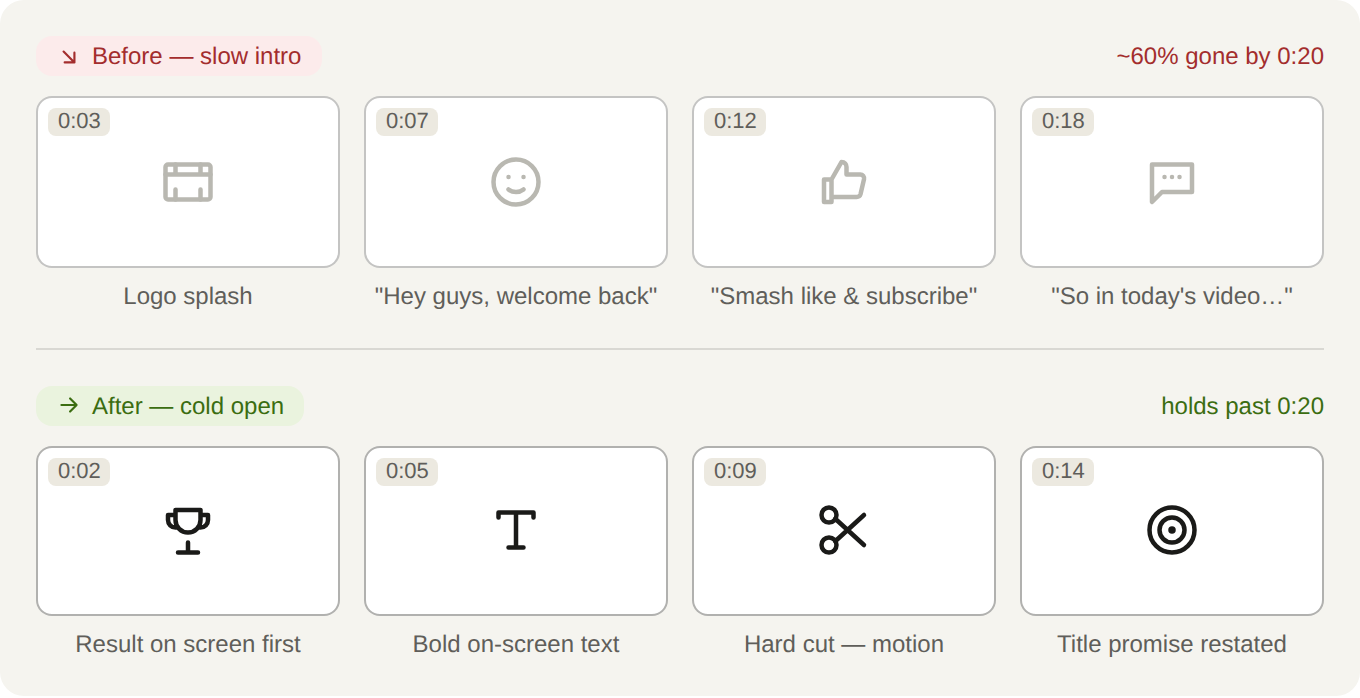
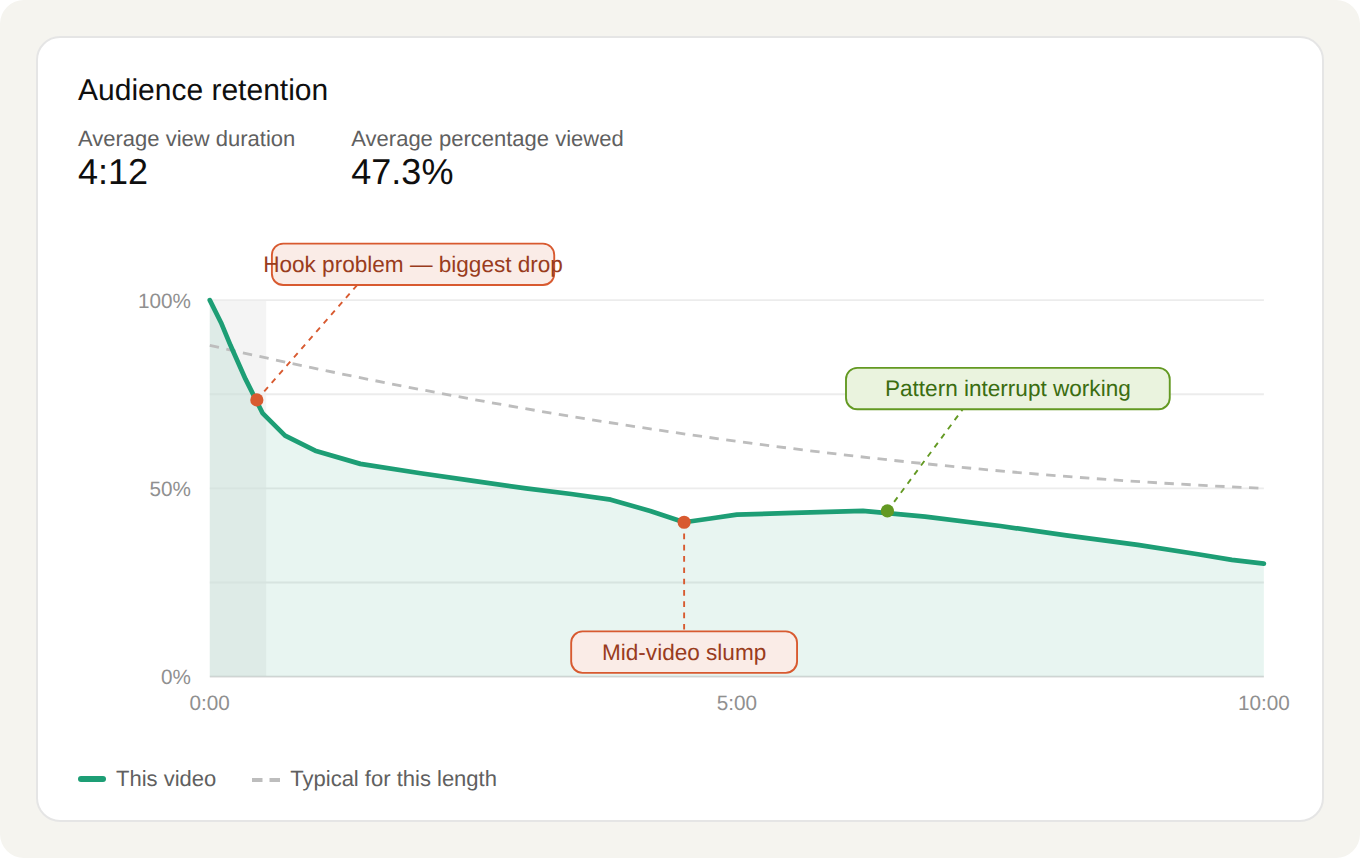
If your Zone 1 drop is steeper than your Zone 2 decline, you have a hook problem, not a content problem. Cut the intro. Rewrite the first sentence. Re-cut the thumbnail to match what you actually deliver. Nothing else matters until this zone is fixed — every downstream fix is wasted if you've already lost 40% of the audience in the first 15 seconds.
Zone 2 (5–40%): pacing is what keeps them
Once the hook lands, the next several minutes are about momentum. Three tactics carry this zone.
Tighten pacing. Delete dead air. Kill rambling. The long "let me explain what this video is about" setup — after you've already started the video — is pure retention poison. Every second has to earn its place. A tight 6-minute video that lands every beat beats a padded 12-minute version of the same idea.
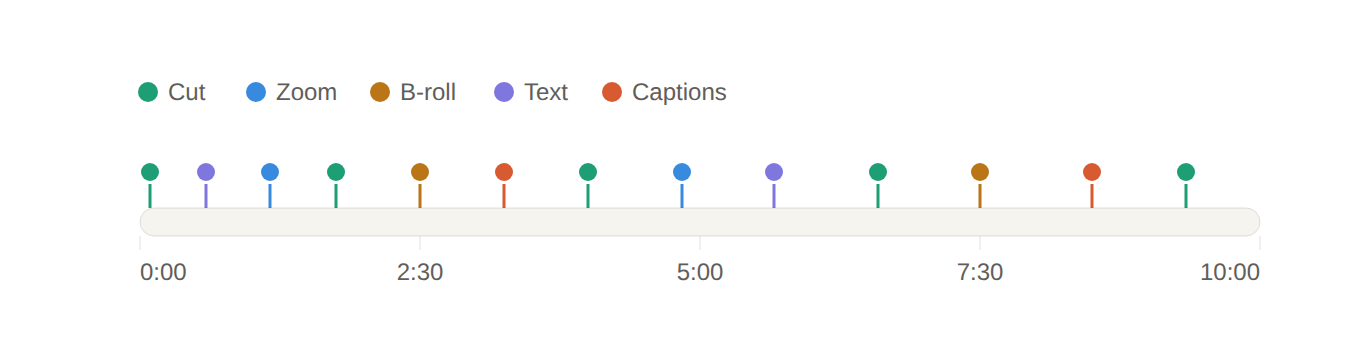
Brains tune out anything constant — same angle, same tone, same shot. Reset attention. Change something. Cadence matters more than size: a small interrupt every 30 seconds beats a dramatic one every three minutes. The modern pattern-interrupt toolkit has three core moves, and the best videos use all three.
Visual cuts. Hard cuts to a new angle. A 10–15% punch-in on the same camera reads as a new shot to the eye and is free to do in the edit. Zooms. Reaction inserts. The goal is to give the eye something new to land on every 20–90 seconds.
Burned-in captions and on-screen text. A majority of mobile-feed views happen with sound off, or with the viewer half- paying-attention. Captions aren't accessibility theatre — they are the most reliable way to keep someone watching when audio isn't doing the work. Burn them in (don't rely on auto-CC) and use on-screen text to reinforce key beats. Treat it as a design layer, not an afterthought.
B-roll, used as a tool not as decoration. B-roll covers cuts, reinforces what you're saying, and resets visual rhythm. Two rules. One: cut back to a front-facing shot soon after — long stretches of disembodied b-roll lose people. Two: the b-roll should illustrate the point, not just "be moving footage." If a stock-footage clip could be swapped in without losing meaning, it's decoration.
"The biggest mistake here is one most people make at the end — I'll get to that in a minute." A question you haven't answered keeps people watching for closure. Plant one inside the first two minutes, pay it off later in the video. Good documentaries pull you through 90 minutes with the same trick repeated. You can pull someone through 10 minutes with one well-placed loop.
Zone 3 (~40–55%): the mid-video slump is real — plant a reset
There's a moment somewhere near the middle of most videos where the curve dips harder than the surrounding slope. The initial promise has been delivered. The viewer is doing a mental "do I still want to be here?" check. If the next 30 seconds don't give them a reason to stay, they bail.
Plant a strong moment there. A story. A surprising stat. A "here's the part everyone gets wrong" beat. This is the second hook — and most creators don't realize they need one. Editorially, treat the midpoint as a chapter break, not a midpoint. The viewer has just finished Act 1; Act 2 needs its own opening beat.
If you only fix one thing in your next video, fix the moment around 40% through. The leverage is real — a strong Zone 3 reset can lift the entire back half of the curve.
Zone 4 (55–95%): structure beats length
Past the slump, what determines whether someone finishes is whether they can feel progress. Two tactics matter here.
Use chapters in the Studio editor. Signpost transitions out loud: "so far we've covered X — here's Y." Viewers who feel oriented stay; viewers who feel lost in the middle of a long video bounce. Chapters are also a search-discoverability win, but the retention case is the bigger one.
Don't stretch a 6-minute idea into 12 to chase watch time. The algorithm doesn't reward length — it rewards retention-weighted watch time. A 6-minute video at 65% retention beats a 12-minute video at 35% on almost every dimension that matters for distribution. If you've said it, end it. The best editors I know cut 20–30% out of every draft before publishing.
Zone 5 (95–100%): engineer the handoff to the next video
The final 30 seconds aren't a goodbye — they're a sales pitch for the next 10 minutes of attention. And in 2026 they carry more weight than they used to.
A viewer who finishes one of your videos and immediately clicks the next one is telling YouTube two things at once: that the last video satisfied them, and that the next one probably will too. That session-level pattern is one of the strongest inputs to the recommendation system — it's how YouTube decides whose homepage your channel shows up on. The end of a video is where you create or destroy that signal.
Close with the actual payoff, not a recap. "Thanks for watching, see you next time" is dead air — cut it. Then point at a specific, relevant next video — the one that picks up where this one left off. End screens with one obvious continuation do most of the work. Generic "watch more from my channel" cards do not.
Two video selection rules. Topical adjacency beats performance: the highest-view video on your channel is rarely the best handoff — the most topically-continuous one is. Same audience, deeper dive: if this video answered "what," the next one should answer "how" or "why now." Make the next click feel like turning a page, not changing channels.
Read your own retention graph
This is the tactic that pulls all the others together — and the only one you genuinely can't skip.
YouTube Studio → Analytics → Engagement → the retention curve for each of your last five videos. For each one, identify the steepest single drop on the curve. Scrub the video to that exact second. Watch what happens. That moment is your next edit.
You'll see patterns. The drop might happen every time you cut to a sponsor read. Every time you switch to a static camera angle. Every time you start a new section without a transitional sentence. The graph will tell you what to fix — it just needs you to look at it as diagnostic data, not as a verdict.
What to do this week
The takeaway
Retention is an architecture problem, not a personality problem. Five zones, ten tactics, one graph. Your retention curve already tells you which zone is failing on each video — you just have to read it as a map of where the video stopped working, not as a report card on whether you're a good creator.
The creators who grow consistently aren't more charismatic than everyone else. They've internalized the five zones, and they edit toward them.
This is a snapshot of how retention works across the platform. For weekly intel on your retention curves — which videos are bleeding viewers in which zones, and what to change on the next upload — MyCoCreator.