
Open Studio → Advanced Mode → Report: Traffic source. Your views are down, but the surfaces aren't moving together. Browse held while Suggested fell. Or Search collapsed while Browse stayed flat. YouTube Browse vs Suggested vs Search traffic each fail for fundamentally different reasons — and the fix depends entirely on which one failed. This is the article that tells you how to read which surface broke and what to do about it.
Why "which one failed" is the question that matters
YouTube doesn't push your video through a single channel. It pushes through three distinct discovery surfaces (plus a handful of smaller ones), each governed by its own scoring system. When views drop, the surface that pulled back tells you almost everything about the cause.
Browse Features rewards homepage relevance. Suggested rewards co-visitation patterns. Search rewards keyword match and watch satisfaction. A drop in one doesn't tell you anything about the others — and trying to fix a Browse drop with Search tactics is wasted work.
The diagnostic step most creators skip: don't ask why views fell. Ask which surface stopped sending viewers, then ask why that specific surface pulled back.
Find the failing surface in Studio
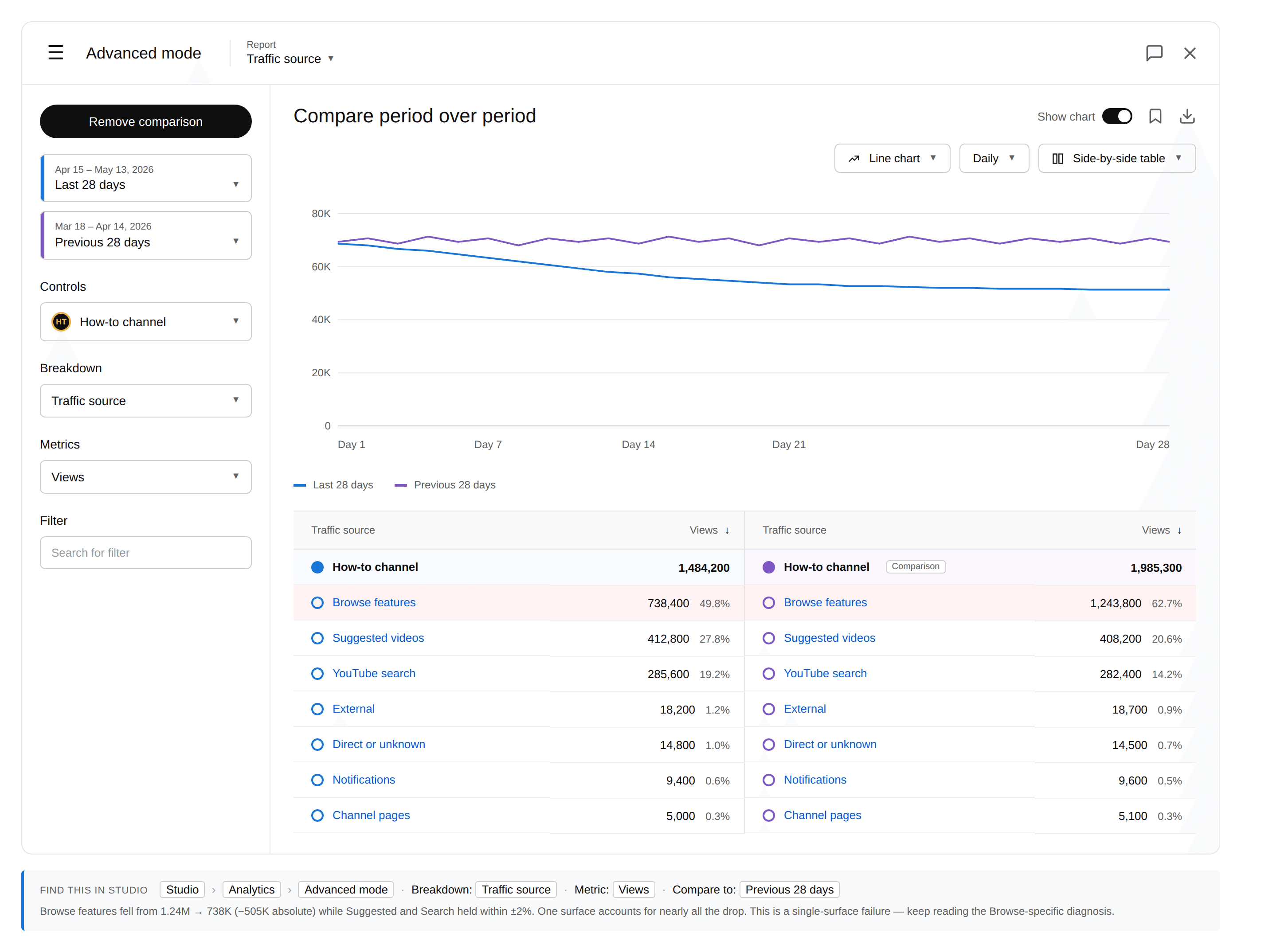
The path: Studio → Analytics → Advanced Mode → set Report to "Traffic source" → enable Compare period over period (Last 28 days vs Previous 28 days).
Sort by absolute drop in views, not percentage. Percentage swings on small sources are noise. A 70% drop on a source that contributed 800 views a week isn't your story. An 8% drop on a source that contributed 60K views a week is.
The surface that lost the most views in absolute terms is your starting point. If a single surface accounts for the majority of the drop, you're in a single-surface failure. If the drop is spread across two or three surfaces, see "When more than one failed" below.
Browse, Suggested, and Search are the three surfaces worth diagnosing. Notifications, External, and Direct are usually too small to drive a real drop — ignore them unless they represent a major share of your traffic.
Read the diagnosis by surface
If Browse Features failed
Browse Features is YouTube's homepage — the videos that show up when a viewer opens the app cold. The Browse algorithm picks based on personalized predictions of what will earn click-through and watch satisfaction.
A Browse drop usually means one of three things. Your packaging stopped earning click-through on the homepage. A larger creator in your niche started getting recommended in slots your videos used to fill. Or your channel-level signal weakened — a cadence drop or topic pivot moved you out of the Browse algorithm's confidence band.
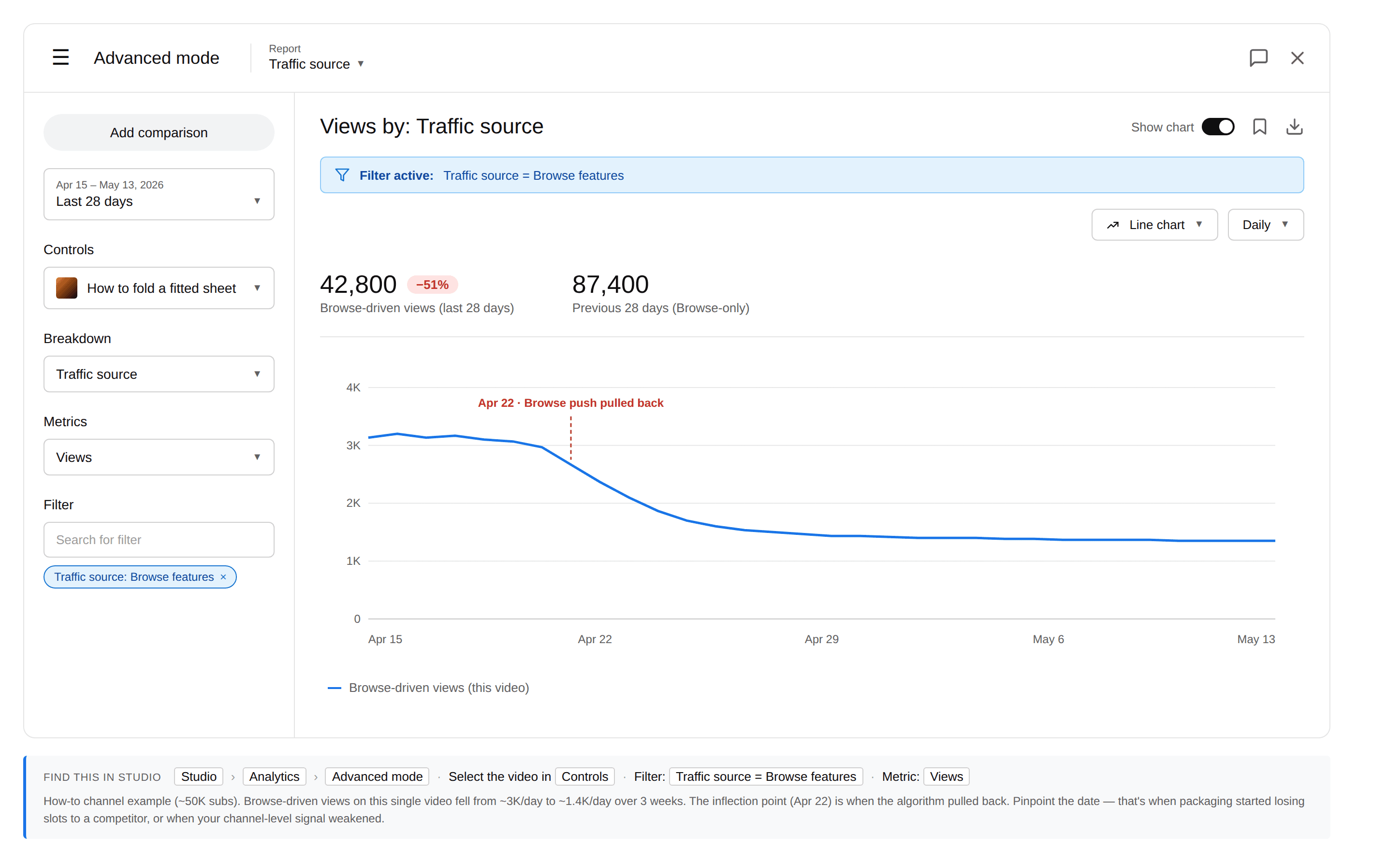
A how-to channel at ~50K subs saw Browse-driven views on a single video fall from ~3K/day to ~1.4K/day over three weeks, with a clear inflection on April 22 — that's the date the algorithm pulled the Browse push back. A competitor with a sharper thumbnail style had started ranking in the same Browse positions. The fix was a thumbnail rework on the next 4 uploads — not an SEO push.
If Suggested Videos failed
Suggested is the sidebar and autoplay. It runs on co-visitation: viewers who watched Video A also watched Video B. When Suggested drops while Browse and Search hold, the recommendation graph shifted away from you.
Unlike Browse and Search, Suggested rarely fails on packaging — the video already won the click on a different video's page. The failure is upstream, in which videos YouTube pairs you with.
The full diagnostic flow for this case is in suggested videos traffic dropped. The short version: check the "Other videos your audience watched" list and look for new channels in the rotation.
If Search failed
Search is the most stable surface — viewers actively type queries — but also the easiest to lose to a specific competitor. A Search drop usually means one of two things. A new video outranked you for your primary keywords. Or your watch satisfaction has slipped enough that YouTube de-prioritized you in the SERP.
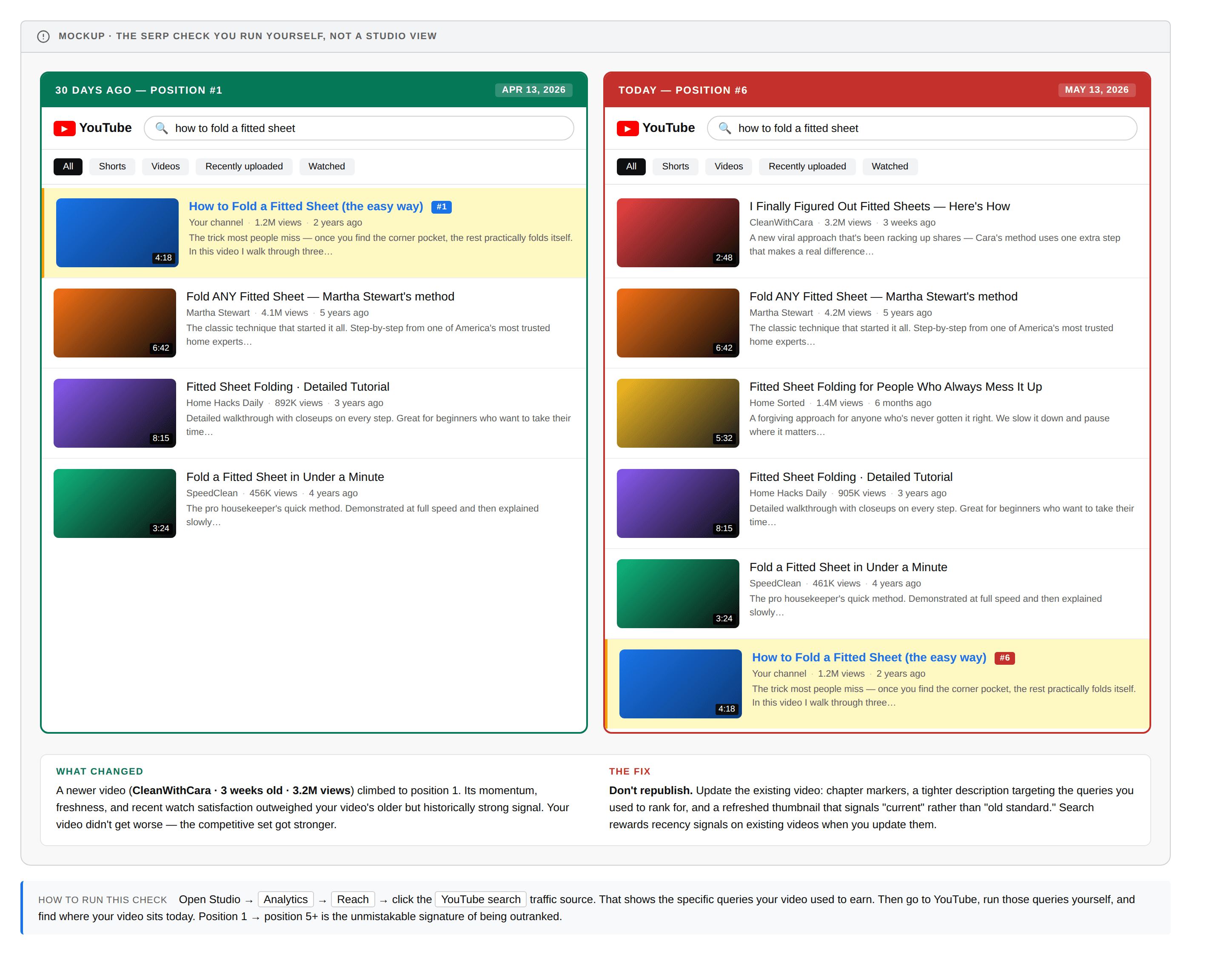
To check: open Reach → Traffic source: YouTube Search → and look at the specific search terms your video was earning. Then go to YouTube and run those queries yourself. If your video has slipped from a top-3 result down past position 5, you've been outranked. If your position held but Search traffic still dropped, the issue is satisfaction — open the retention graph against your trailing baseline.
A how-to channel saw Search traffic fall sharply on a top-performing "how to fold a fitted sheet" video while Browse and Suggested held flat. Running the query on YouTube revealed the cause: a newer video (CleanWithCara, 3 weeks old, 3.2M views) had climbed to position 1, pushing the original video down to position 6. The fix wasn't republishing — it was updating the existing video with chapter markers, a tightened description targeting the query, and a refreshed thumbnail that signaled "current" rather than "old standard."
When more than one failed at once
If Browse and Suggested both fell while Search held, the issue is usually a distribution pullback — the algorithm pulled the broad-audience push but kept ranking you in active searches. Read impressions dropped but CTR is fine for the full diagnosis on that signature.
If all three surfaces fell together, you're not looking at a traffic-source-specific problem. Go back to how to read YouTube analytics when your views drop and start over with the broader framework — channel-level signals, post-outlier reversion, or seasonality.
What to try next
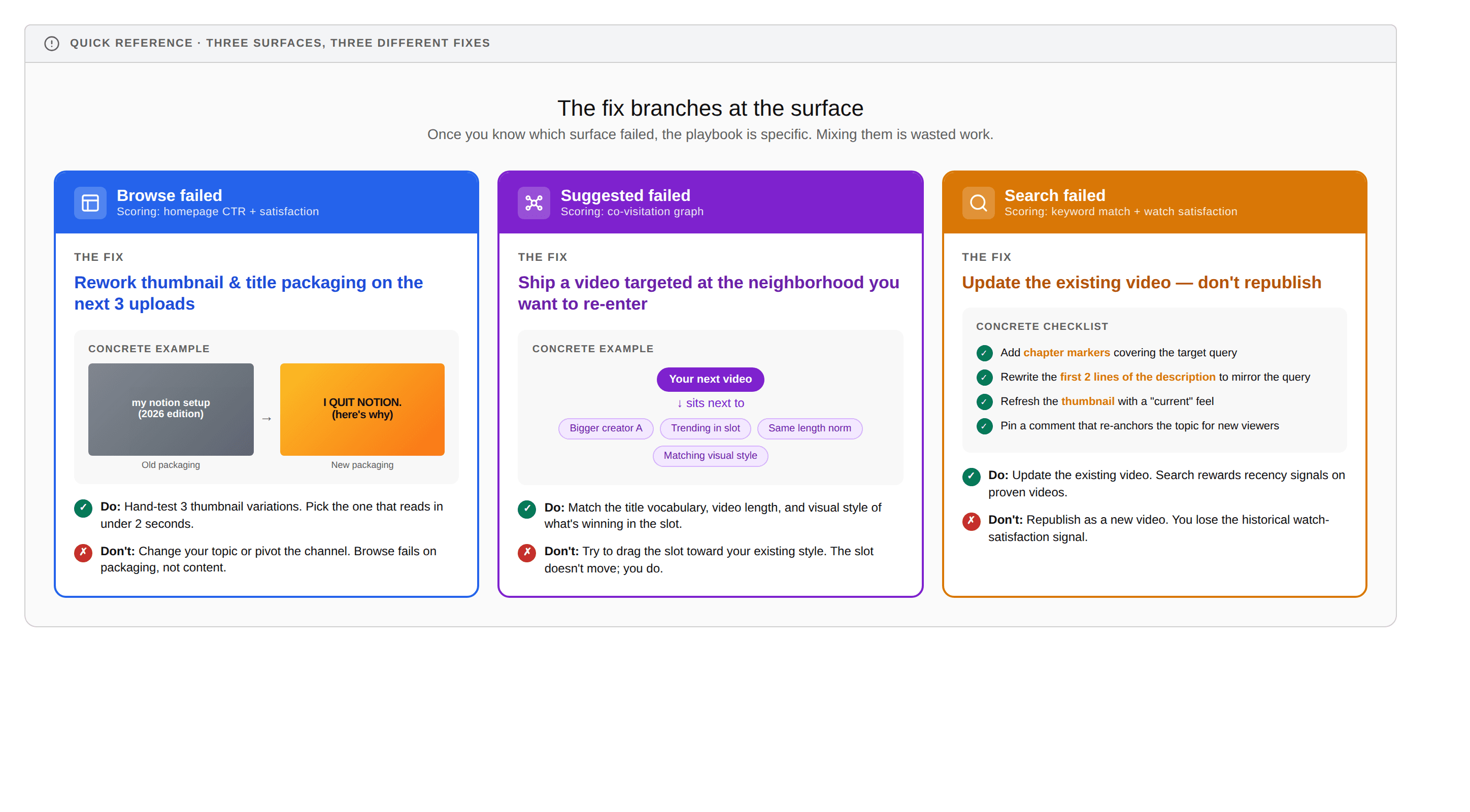
Once you've identified which surface failed, the playbook is specific. Mixing fixes across surfaces is wasted work. Here's the cheat sheet:
Identifying which surface failed is a one-time diagnostic. The harder ongoing question — what's moving across your niche, which competitors are growing on each surface, where the next opportunity lives — takes more time. MyCoCreator is growth intelligence for that: niche and web tracked, weekly intel surfaced, so you skip the research.
Frequently asked questions
How do I know which YouTube traffic source dropped?
Open Studio → Analytics → Advanced Mode → set Report to "Traffic source" → enable Compare period over period (Last 28 days vs Previous 28 days). Sort by absolute drop, not percentage. The surface that lost the most views in absolute numbers is your diagnostic starting point. Ignore percentage swings on small sources — they're noise.
Why did my Browse Features traffic drop on YouTube?
Browse Features serves the homepage. It usually drops because your packaging stopped earning click-through on the homepage, a larger creator took the slots your videos used to fill, or a channel-level signal (cadence, topic pivot) moved you out of the algorithm's confidence band. Thumbnail and title rework is usually the right response, not a topic change.
Why did my YouTube Search traffic drop?
Search drops for one of two reasons. A newer video outranked you for your primary keywords, or your watch satisfaction has slipped enough that YouTube de-prioritized you in the SERP. Check your position for the keywords the video used to rank for; if you've been outranked, update the existing video rather than republishing it.
Is it normal for one YouTube traffic source to drop while others hold steady?
Yes — and that pattern is actually a useful signal. Each YouTube surface (Browse, Suggested, Search) is governed by its own scoring system, so an isolated drop on one surface narrows the diagnosis significantly. Drops across all three at once point at a broader issue and need a different framework.