
Your Studio is open. The graph is red. Before you re-shoot anything or change thumbnails, spend 15 minutes reading the data. Most view drops aren't mysterious — they leave a specific signature in Studio across traffic source, impressions, CTR, and retention. This is how to read YouTube analytics when your views drop, without guessing. The pattern tells you what to fix, and which thing not to touch.
Zoom out to 90 days before you panic
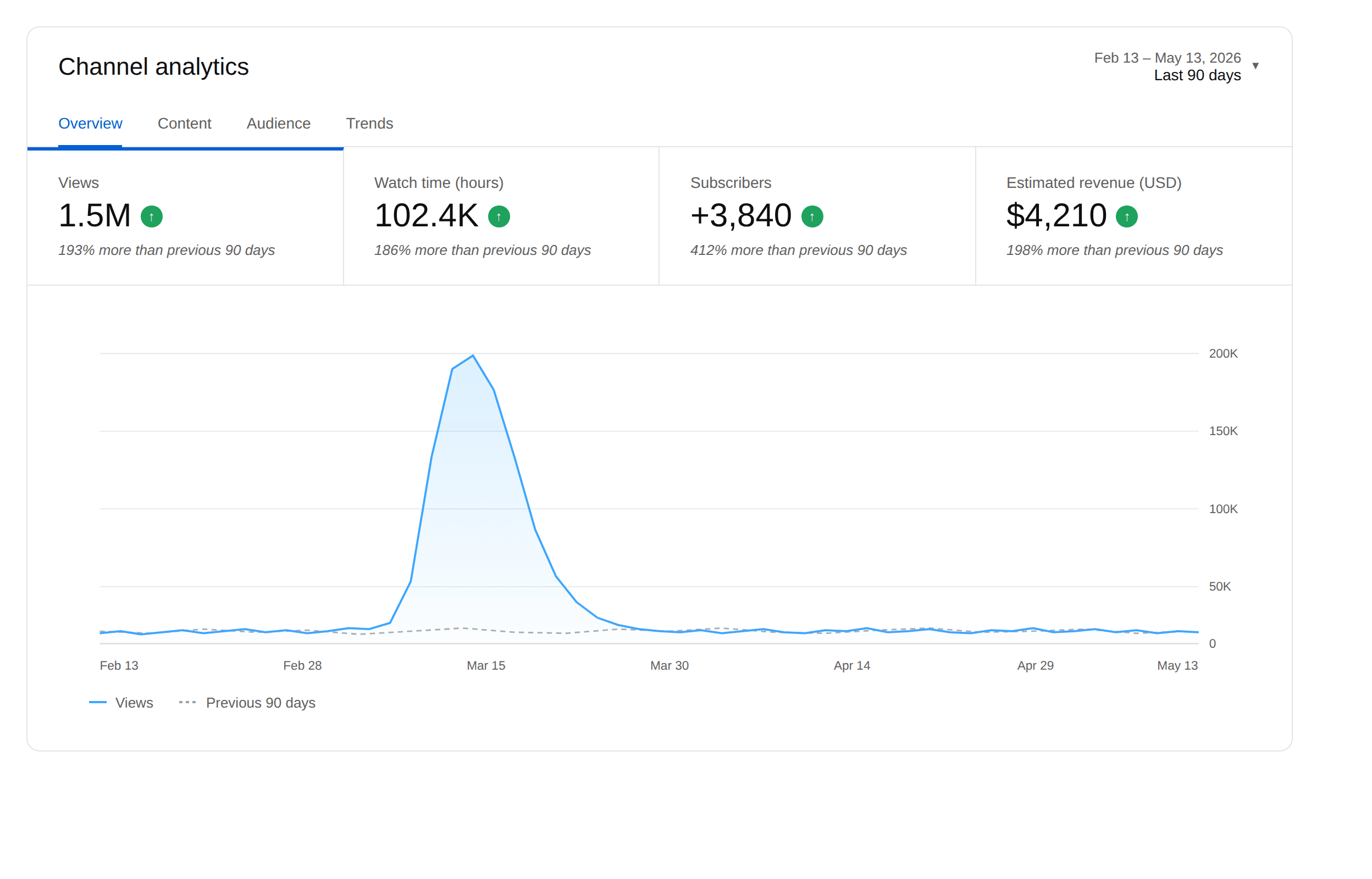
The first move isn't checking anything new. It's changing the date range. Set Studio to Last 90 days instead of the default 28.
About half the drops I look at aren't drops — they're reversion after one outlier video. A cooking channel at 38K subs came to me convinced their channel was dying. Views had fallen from 280K the prior month to 180K. But that prior month had one video at 1.2M views. Pull that video out and baseline was 165K. They weren't down. They were slightly up.
Rule: if your last 7 days look bad and your prior 30 days had a video at 3x your normal performance, you're diagnosing post-outlier reversion, not a drop.
Match your drop to one of four patterns
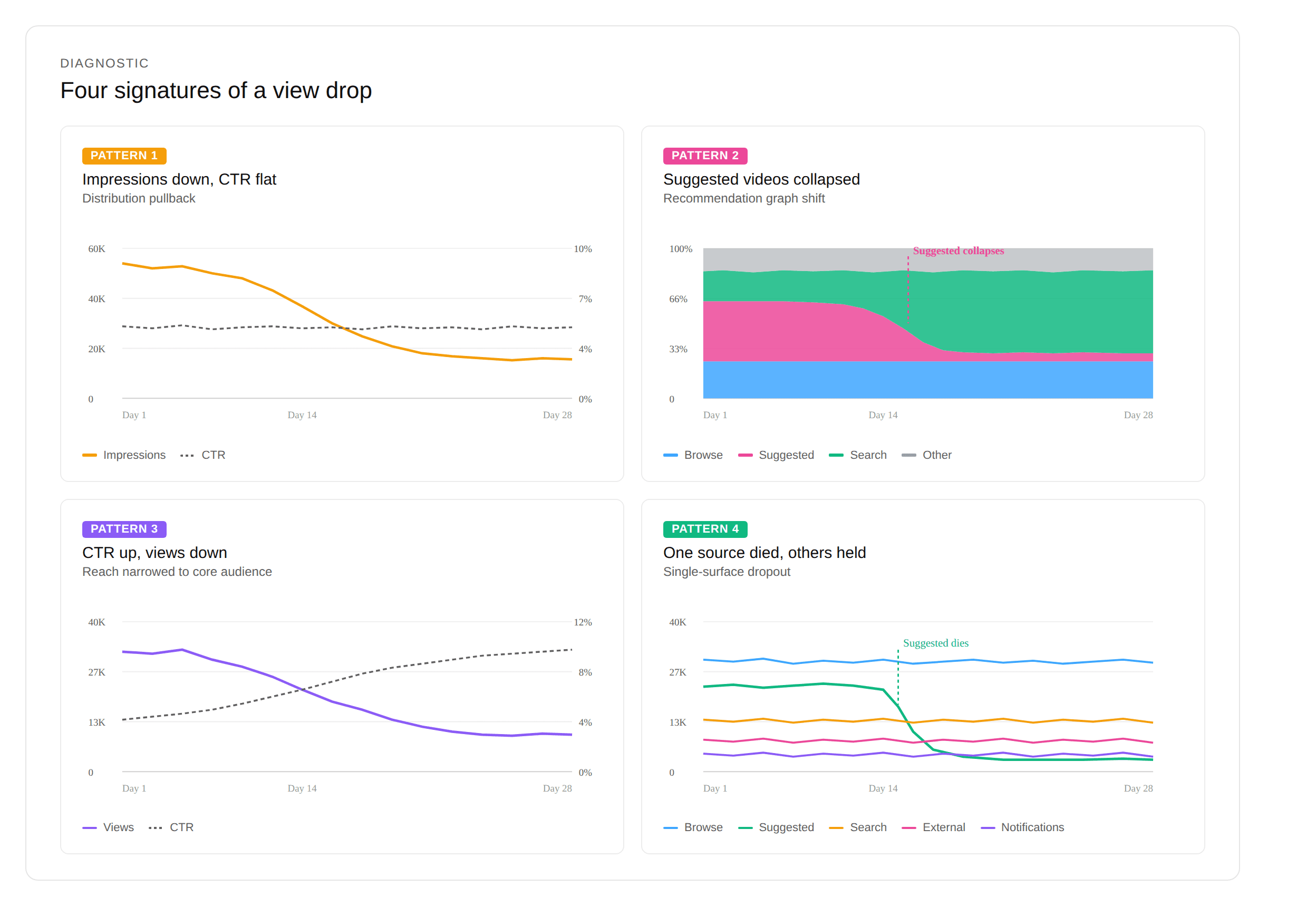
Once you've confirmed the drop is real, the next step is matching its shape. There are four common patterns. They look identical at the top-line views number but completely different inside Studio. Each has its own cause and its own fix.
Pattern 1 — Impressions down, CTR flat
Distribution pulled back: the algorithm is showing your video to fewer people, but the click-through rate among them held.
Diagnose deeper: impressions dropped but CTR is fine.
Pattern 2 — Suggested videos collapsed
Total impressions held, but the "Suggested videos" row in your Traffic source report fell off a cliff.
Diagnose deeper: suggested videos traffic dropped.
Pattern 3 — CTR up, views down
Your reach narrowed to your hardcore audience: fewer impressions overall, but the ones that remain are from people primed to click.
Diagnose deeper: why CTR went up but views went down.
Pattern 4 — One traffic source died, others held
Your channel mix changed: one traffic surface stopped working while the rest stayed steady.
Diagnose deeper: browse vs suggested vs search traffic — which one failed.
If your data doesn't fit one cleanly, you're probably looking at two patterns at once. That happens. Treat the bigger one first.
Read traffic sources in this exact order
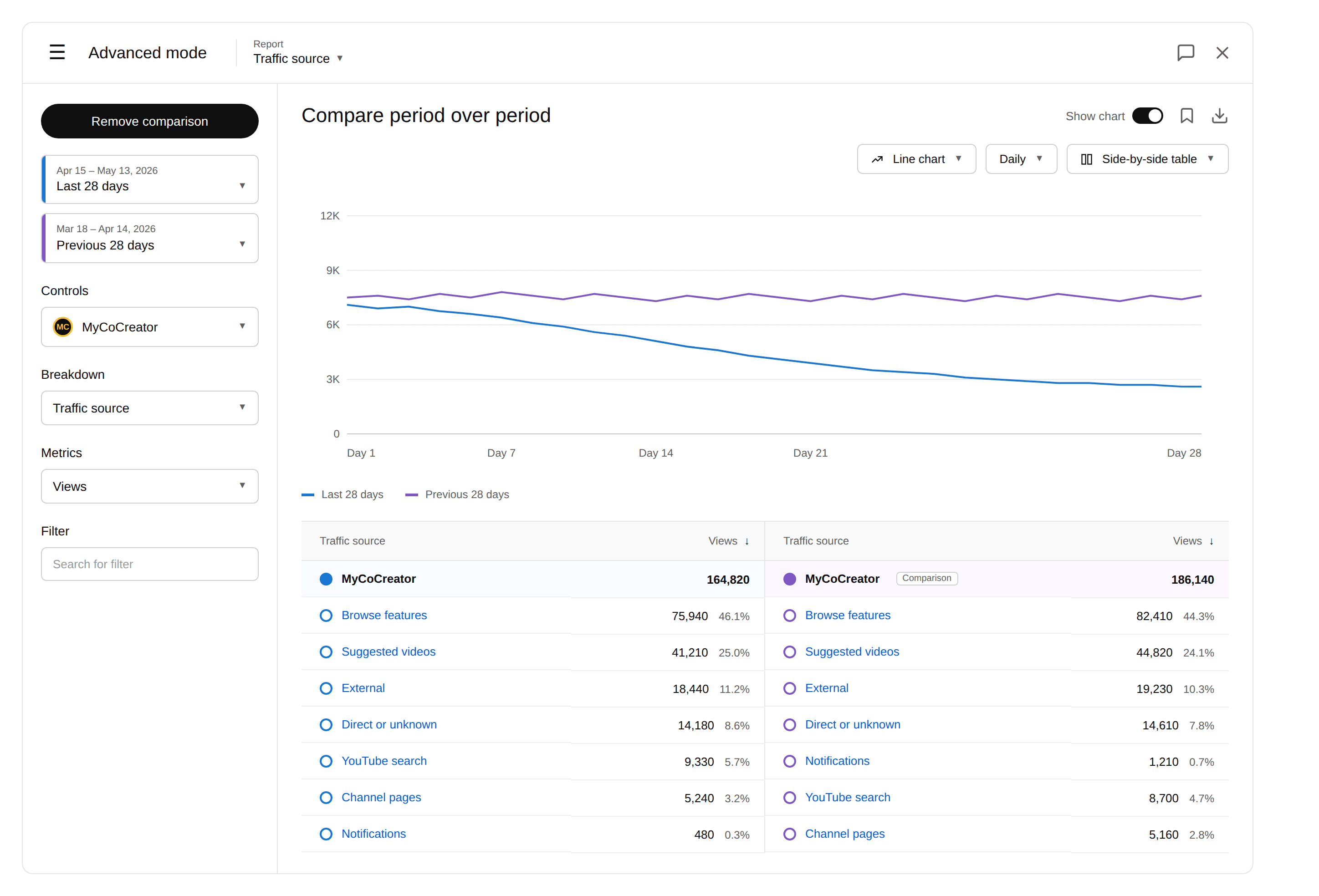
In Studio: Advanced Mode → set Report to "Traffic source" → enable Compare period over period (Last 28 days vs Previous 28 days). Sort by absolute view drop, not percentage.
The surface that dropped most by absolute number is your prime suspect. Ignore percentage swings on small sources. Notifications falling 60% on a channel that gets 200 notification views a week isn't your story. Browse Features falling 8% on a channel that gets 80K Browse views a week is.
Don't trust the dashboard summary view — it averages everything. Go to Advanced Mode.
Cross-check audience retention before you blame the algorithm
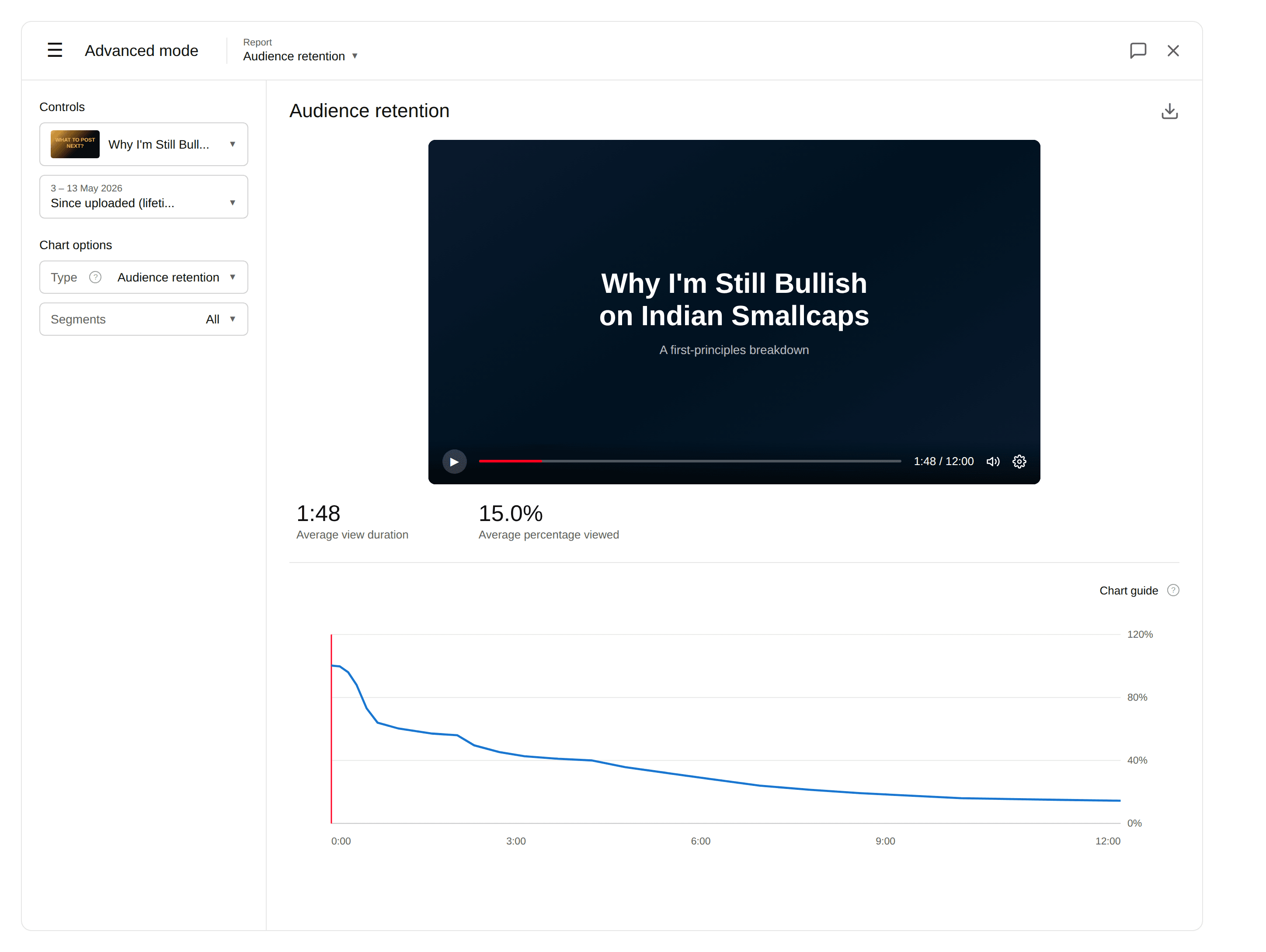
This is the step most creators skip. Open your last 5 uploads. Look at Average View Duration and the retention graph for each.
If retention is roughly the same as your trailing average, content's not the problem — distribution changed. If retention is 10+ percentage points lower than your baseline, your content changed first, and the algorithm responded to it.
A finance channel at 45K subs came to me certain they'd been "demoted by the algorithm." Their AVD on the last three videos was 1:48. Their trailing baseline was 4:12. The algorithm hadn't done anything — they'd shipped three slower openings in a row. The data was unambiguous.
Rule: if retention on the new uploads is bad, fix the content. If retention is fine, fix the distribution.
Check the date against your own recent decisions
YouTube doesn't announce ranking changes by calendar. But you make changes you can date precisely. Open a notes app and list the last 30 days: upload-schedule shifts, topic pivots, thumbnail-style changes, title-length changes, new series launches.
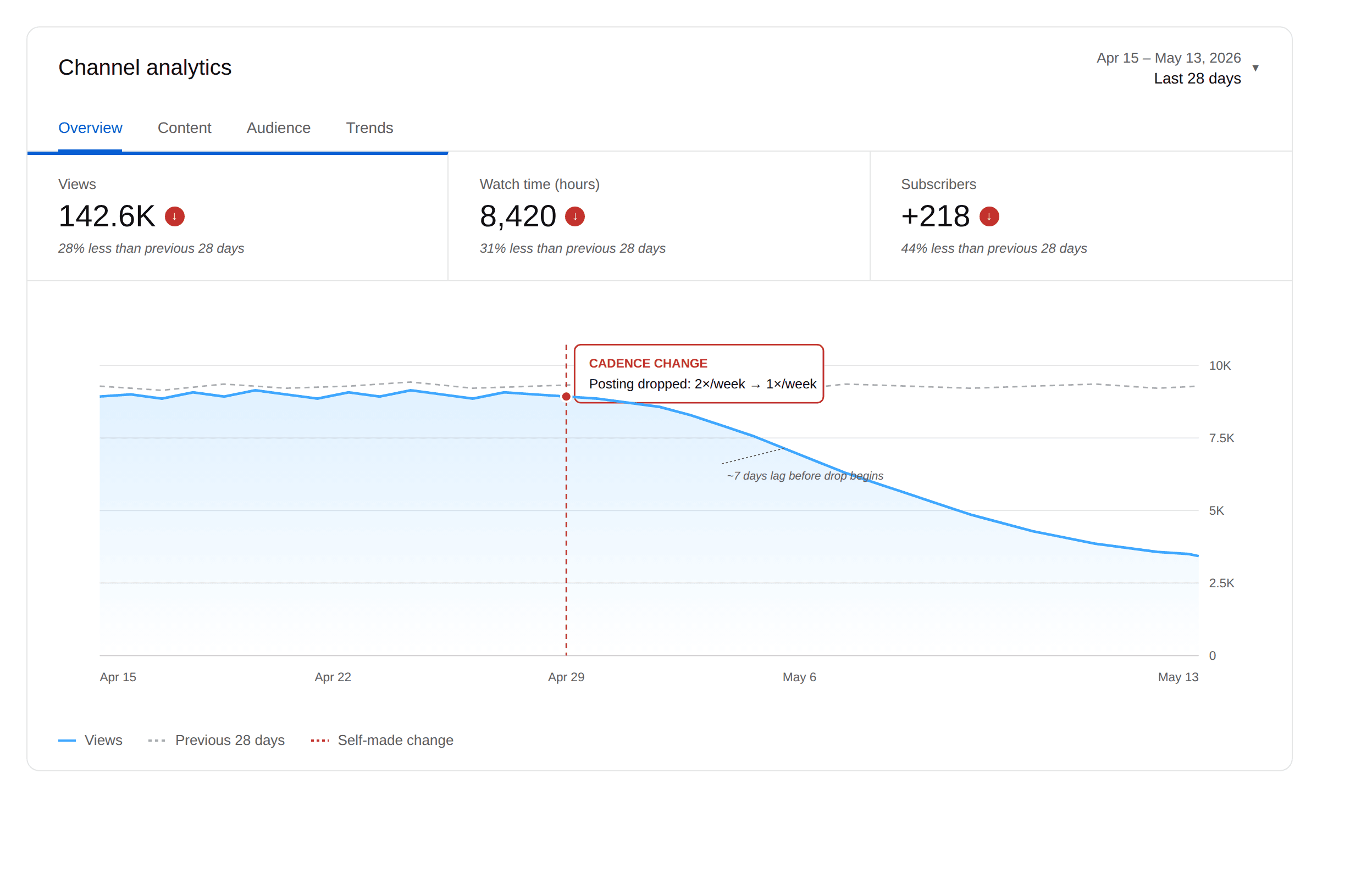
Now overlay the drop date. If the drop starts within 7 days of one of your own changes, that change is the cause until proven otherwise. The algorithm doesn't randomly punish you. It responds to specific inputs — and the most recent inputs are usually yours.
The most common self-inflicted cause I see: a 30%+ posting cadence drop. Going from 2x/week to 1x/week for three weeks signals reduced activity to the recommendation system, and it responds.
What the analytics can't tell you
A few things Studio will never show you, and you have to stop asking it to.
Whether YouTube rolled out an internal ranking change in the last two weeks. They don't publish a changelog. You can sometimes detect this by checking creators in your niche on a similar publishing schedule — if three or four channels dropped on the same date, the platform changed something.
Whether a new competitor broke through in your niche and started eating your share of Suggested. Studio doesn't show you who's competing with you for the same recommendation slots.
Whether seasonality is masking the signal. December and August are real. Most channels lose ground in those months no matter what.
Calibrated honesty: even with all the above, some drops never get a clean explanation. Don't burn a week looking for one that isn't there.
The 15-minute checklist
Zoom Studio to 90 days. Confirm the drop is real, not post-outlier reversion. Identify which of the four patterns you're looking at. Click into the relevant spoke article for that pattern. Cross-check retention against your trailing baseline. Audit your last 30 days of decisions. If none of that resolves it, wait 7 more days before changing anything — knee-jerk responses to noise are how creators tank their own channel.
This framework handles the diagnosis. The harder question — what's actually moving across your niche, where the opportunities are, where to focus next — takes more than 15 minutes a week. MyCoCreator is growth intelligence for that: niche and web tracked, weekly intel surfaced, so you skip the research.
Frequently asked questions
Why did my YouTube views suddenly drop?
Most sudden drops fall into one of four patterns: impressions fell while CTR held (distribution pullback), Suggested-videos traffic collapsed (recommendation graph shift), CTR rose while views fell (narrower reach), or a single traffic source died while others held steady. Match the pattern in Studio's Advanced Mode under Report: Traffic source before deciding what to change.
How do I tell if it's the algorithm or my content?
Check audience retention on your last 5 uploads against your trailing baseline. If retention is within a few percentage points of normal, the content is fine and distribution changed. If retention dropped 10+ percentage points, the content changed first and the algorithm responded to it.
How long should I wait before changing my strategy after a view drop?
At least 7 days after you've finished the diagnostic checklist. Knee-jerk responses to short-term noise are one of the most common ways creators damage their own channel. If the drop persists past 14 days with no identifiable cause, then change one variable — not three.
What's the first thing to check in YouTube Studio when views drop?
Change the date range to Last 90 days before checking anything else. About half of perceived drops are actually post-outlier reversion — one viral video inflated the previous period and you're now comparing against an unrepresentative peak.