
Open Studio, go to Traffic source type, and the "Suggested videos" row is way down while Browse and Search held steady. When Suggested videos traffic dropped on you, it's one of the harder signatures to read because the surface itself is opaque. But here's the move that changes the diagnosis: Suggested traffic isn't about your channel — it's about your viewer. The algorithm didn't decide your videos are bad. It decided your typical viewer is watching something different this week.
What "Suggested videos traffic dropped" actually means
Suggested is the sidebar and autoplay surface. YouTube fills it based on what the current viewer wants next, not based on how the current video performs in isolation. Two videos with identical metadata can earn wildly different Suggested traffic depending on whose feed they show up next to.
This is why Suggested drops feel mysterious. You didn't change anything about the video. But the people YouTube was suggesting it to last week have shifted what they're watching this week. The algorithm followed them. Your slot didn't.
Three causes account for almost every Suggested drop. The videos you used to be suggested alongside stopped getting recommended — when a creator above you stops uploading, their reach contracts, and the slots next to their videos get reassigned. A new competitor moved into your recommendation neighborhood — someone published the right title at the right time and started eating the Suggested slot you used to own. Your viewer's interests shifted — seasonality, current events, or a viral trend pulled your audience into a different content cluster.
Confirm it's Suggested specifically, not the whole funnel
Before you treat this as a Suggested-only problem, rule out the case where impressions across all surfaces dropped together.
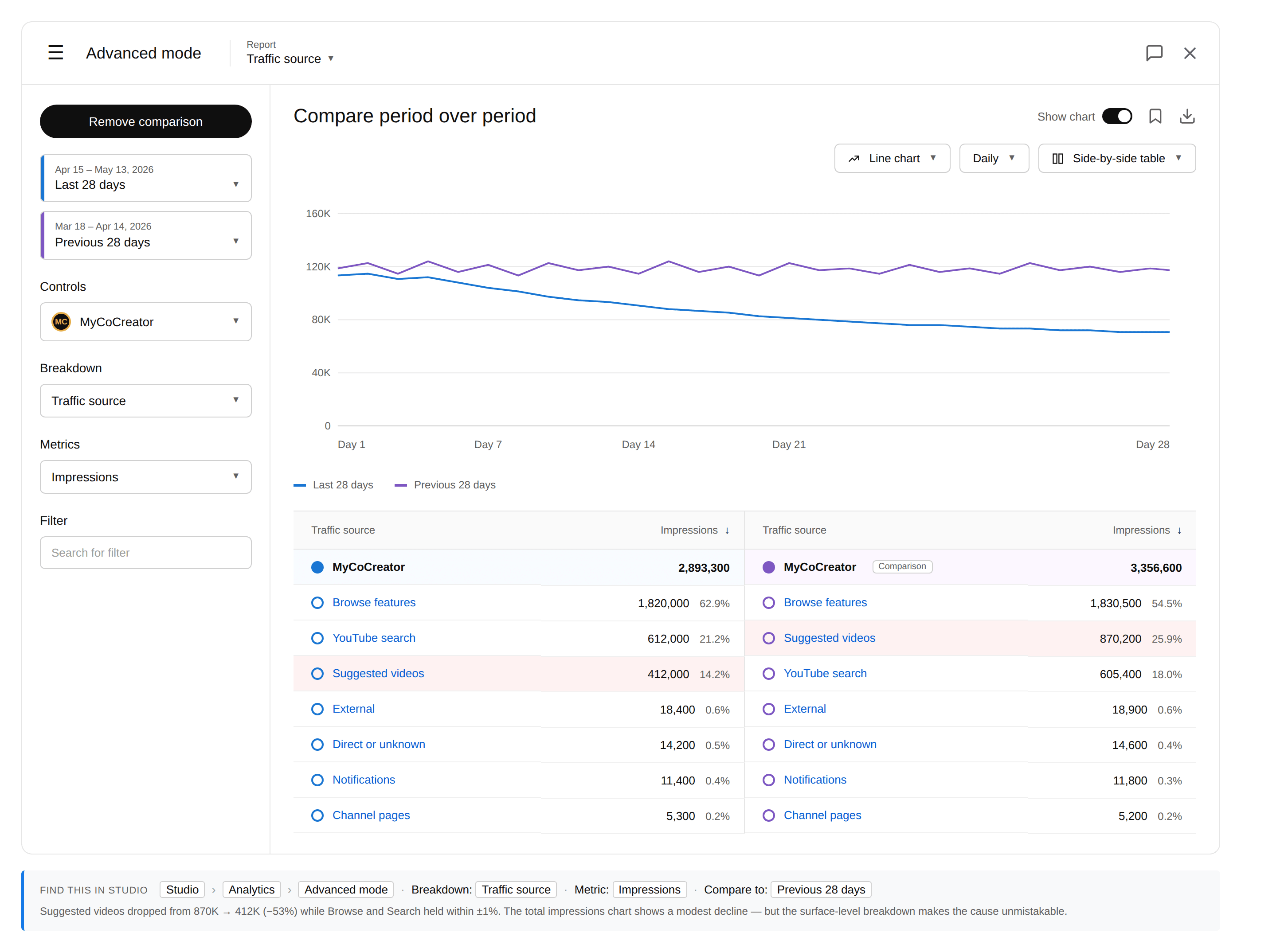
In Studio: Advanced Mode → set Report to "Traffic source" → enable Compare period over period (Last 28 days vs Previous 28 days). Look at the absolute drop on Suggested vs Browse vs Search.
If Suggested fell sharply and the others held, you're in the right place — keep reading. If Suggested and Browse both fell, you may be in a broader distribution pullback. Read impressions dropped but CTR is fine first. If everything fell together, go back to how to read YouTube analytics when your views drop for the broader framework.
Find which videos lost Suggested traffic
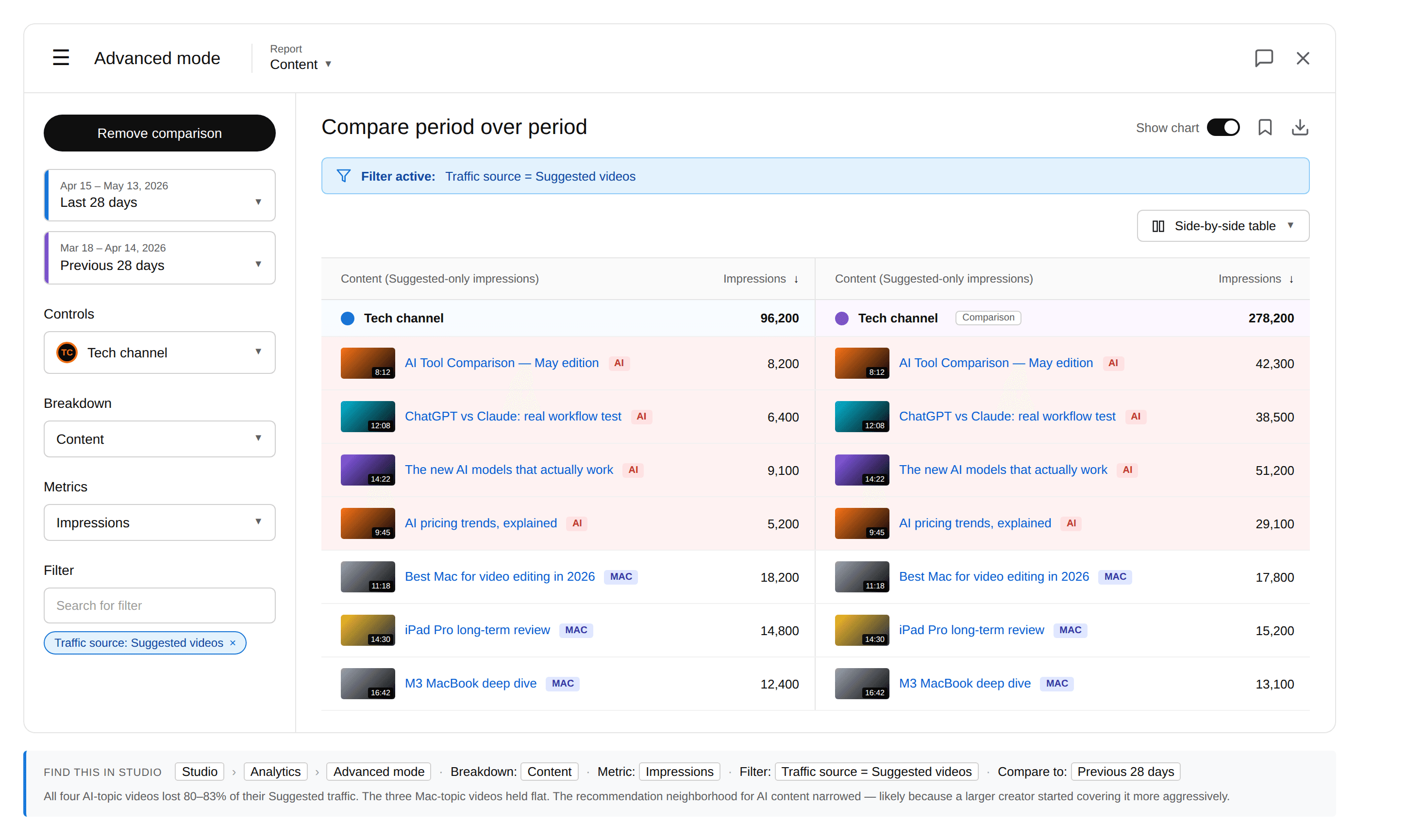
Open Studio → Analytics → Advanced Mode → set Report to Content, Metric to Impressions, and add a Filter: Traffic source = Suggested videos. Enable Compare period over period. Now you see each video's Suggested-only impressions for the last 28 days against the previous 28.
A handful of videos lost all their Suggested traffic
Those videos' co-visitation neighborhood shifted. The other videos people used to watch alongside them aren't being recommended together anymore.
Suggested fell evenly across the back catalog
A channel-level signal changed: your audience drifted, or a competitor took over your topic cluster.
A specific example: a tech channel saw all four of its AI-topic videos lose 80–83% of their Suggested traffic while three Mac-topic videos held flat over the same 28 days. Same channel, same period, same diagnostic surface — only one topic cluster was hit. The recommendation neighborhood for AI content narrowed, likely because a larger creator started covering it more aggressively.
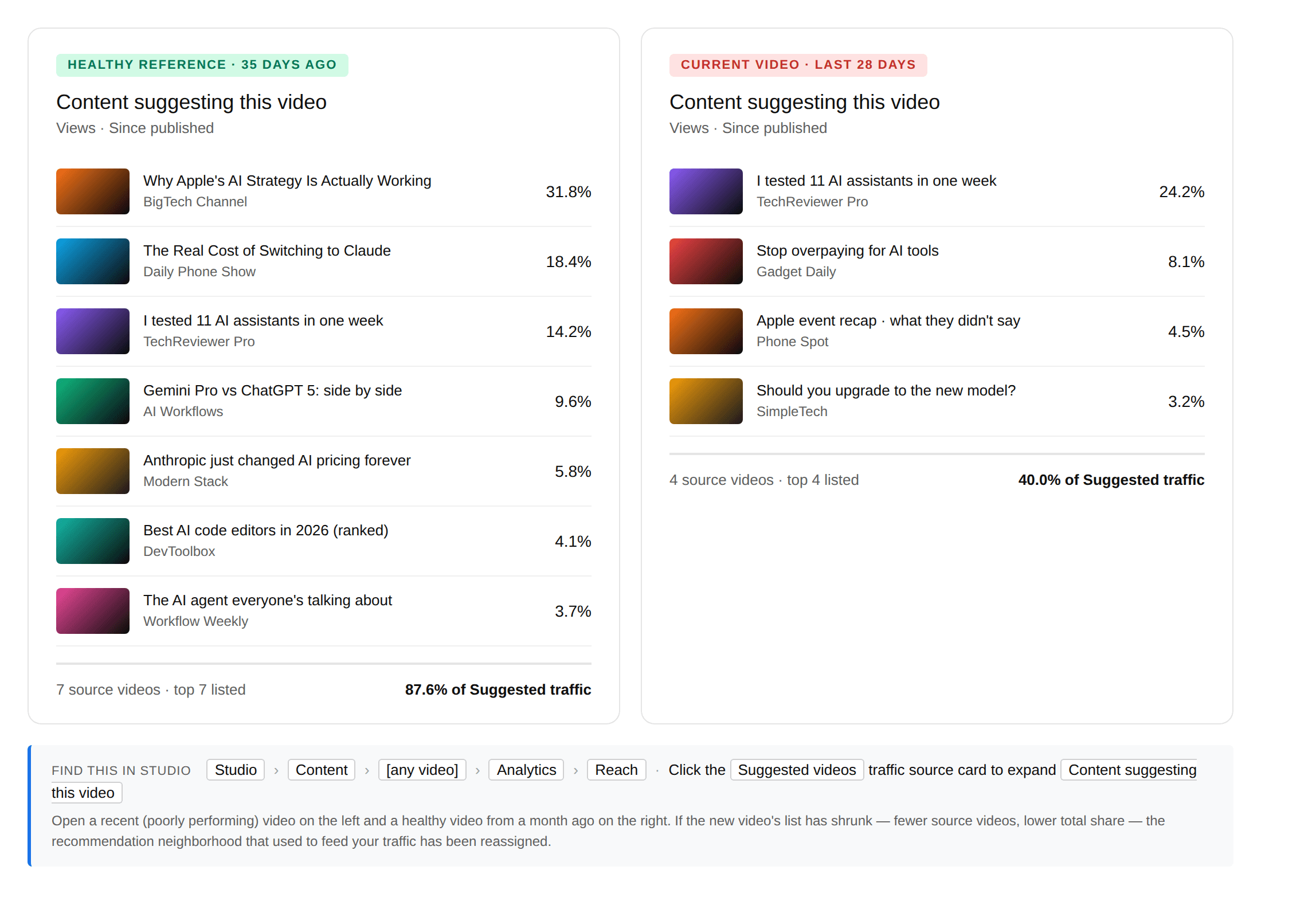
Once you've spotted a video that lost Suggested, drill deeper. Open that video's analytics → Reach → click the "Suggested videos" traffic-source card. Studio expands it into "Content suggesting this video" — the list of videos that used to feed Suggested traffic to it. If that list has shrunk dramatically, the recommendation neighborhood around that specific video was reassigned.
Read "Other videos your audience is watching"
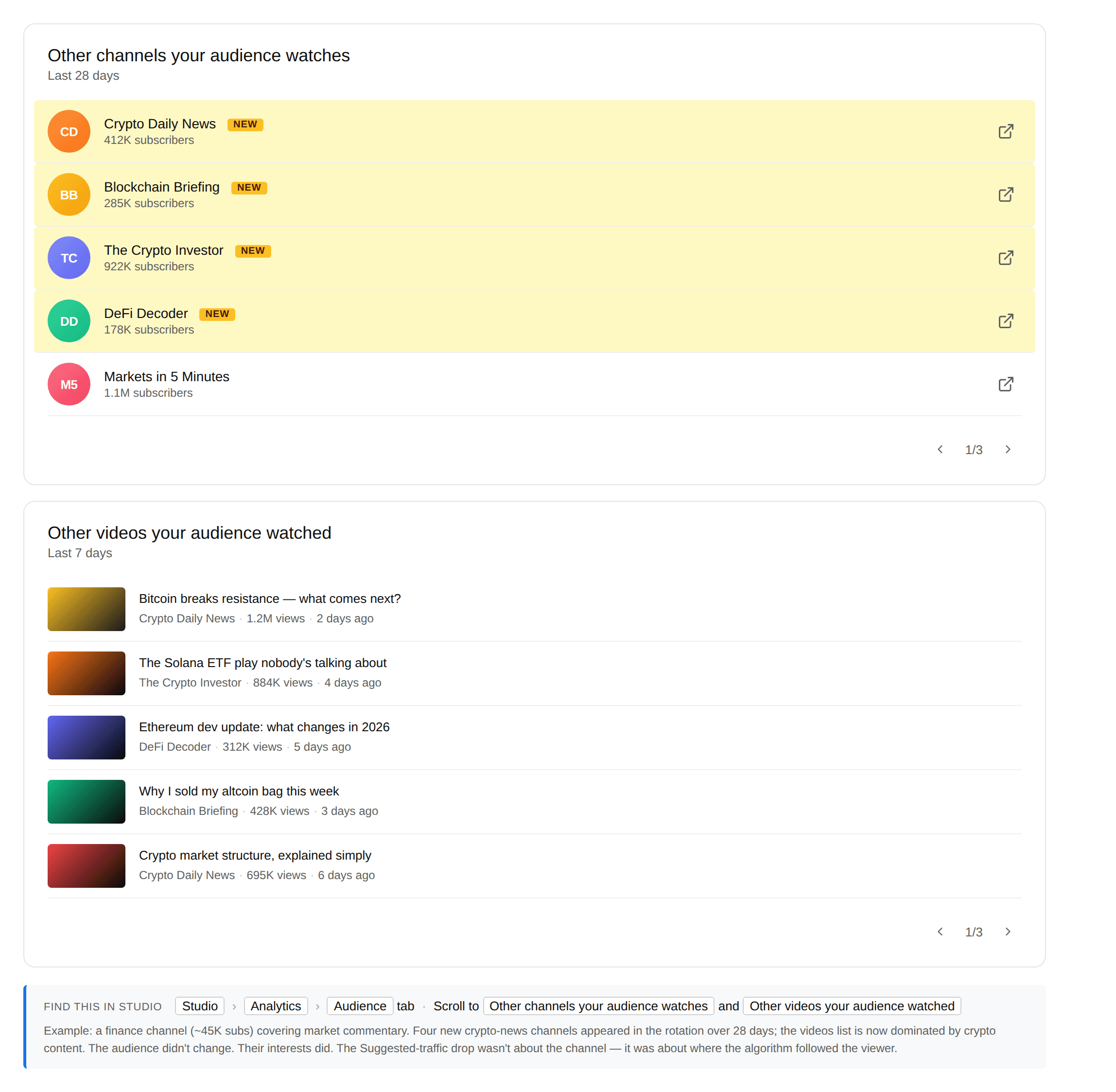
This is the underused pair of Studio views that tells you what actually shifted. Audience tab → scroll to "Other channels your audience watches" and "Other videos your audience watched". Read them together — channels show whose orbit your viewers are now in; videos show what specifically caught their attention this week.
Compare this list to the same view from 30 days ago. Three signals to read.
The list looks roughly the same
Your audience's behavior didn't change much. The drop is probably a slot-reassignment issue, not a neighborhood shift.
Several new channels appeared
A competitor moved into your audience's rotation. Your Suggested slot is being shared with theirs — or replaced.
The list looks completely different
Your audience's interests genuinely shifted. Your videos are now sitting outside their current rotation.
A finance channel at ~45K subs saw their "Other videos audience watched" list flip almost entirely from market-commentary creators to crypto-news creators over four weeks. They hadn't changed their content. Their viewers had pivoted, and the algorithm followed.
What to try (and what to wait on)
Three moves, picked from the diagnosis above.
If a topic cluster lost Suggested, ship a video specifically targeted at the recommendation neighborhood you're trying to re-enter. Match title vocabulary, video length, and visual style to what's currently winning in that slot. Don't try to drag the slot toward your style — the slot doesn't move.
If a competitor moved in, don't compete head-on with the same topic at lower production quality. Find the adjacent topic they're not covering and own that slot.
If your audience pivoted, decide whether to follow them or build a new audience. Both are valid. Following is faster but reshapes the channel; building is slower but keeps your editorial identity. There is no neutral option.
Spotting the Suggested drop is the easy part. Mapping which channels are growing in your audience's rotation, which competitors are taking neighborhood slots, and where the next opportunity lives — that's the slower ongoing work. MyCoCreator is growth intelligence for that: niche and web tracked, weekly intel surfaced, so you skip the research.
Frequently asked questions
Why did my Suggested videos traffic drop suddenly?
Suggested traffic is driven by what your viewers want to watch next, not by your channel's own metrics. A drop usually means one of three things: the videos you used to be suggested alongside lost their own reach, a new competitor moved into your recommendation neighborhood, or your audience's interests shifted to a different topic cluster. The fix depends on which of the three is happening.
How is Suggested videos traffic different from Browse?
Browse is YouTube's homepage — what shows up when a viewer opens the app cold, based on their long-term interests. Suggested is the sidebar and autoplay — what shows up after they're already watching a video, based on the session and the current video's context. Browse drops usually point at packaging or topical relevance; Suggested drops usually point at neighborhood or co-visitation shifts.
Does dropping Suggested traffic mean my niche is wrong?
Not necessarily. As YouTube's creator liaison Rene Ritchie has put it, Suggested is based on what the viewer likes to watch — not what the current video's creator makes. Your niche may be fine, but the viewers in that niche may have temporarily drifted, or the recommendation neighborhood around your videos may have reshuffled. Check the "Other videos your audience watched" list before changing your niche strategy.
How do I check which videos used to send me Suggested traffic?
In Studio, open any individual video → Analytics → Reach → click the "Suggested videos" traffic-source card. Studio expands it into "Content suggesting this video" — the list of specific videos YouTube was using to drive Suggested traffic to yours. If that list has shrunk or shifted compared to a video from a month ago, that's where the slot reassignment happened.